
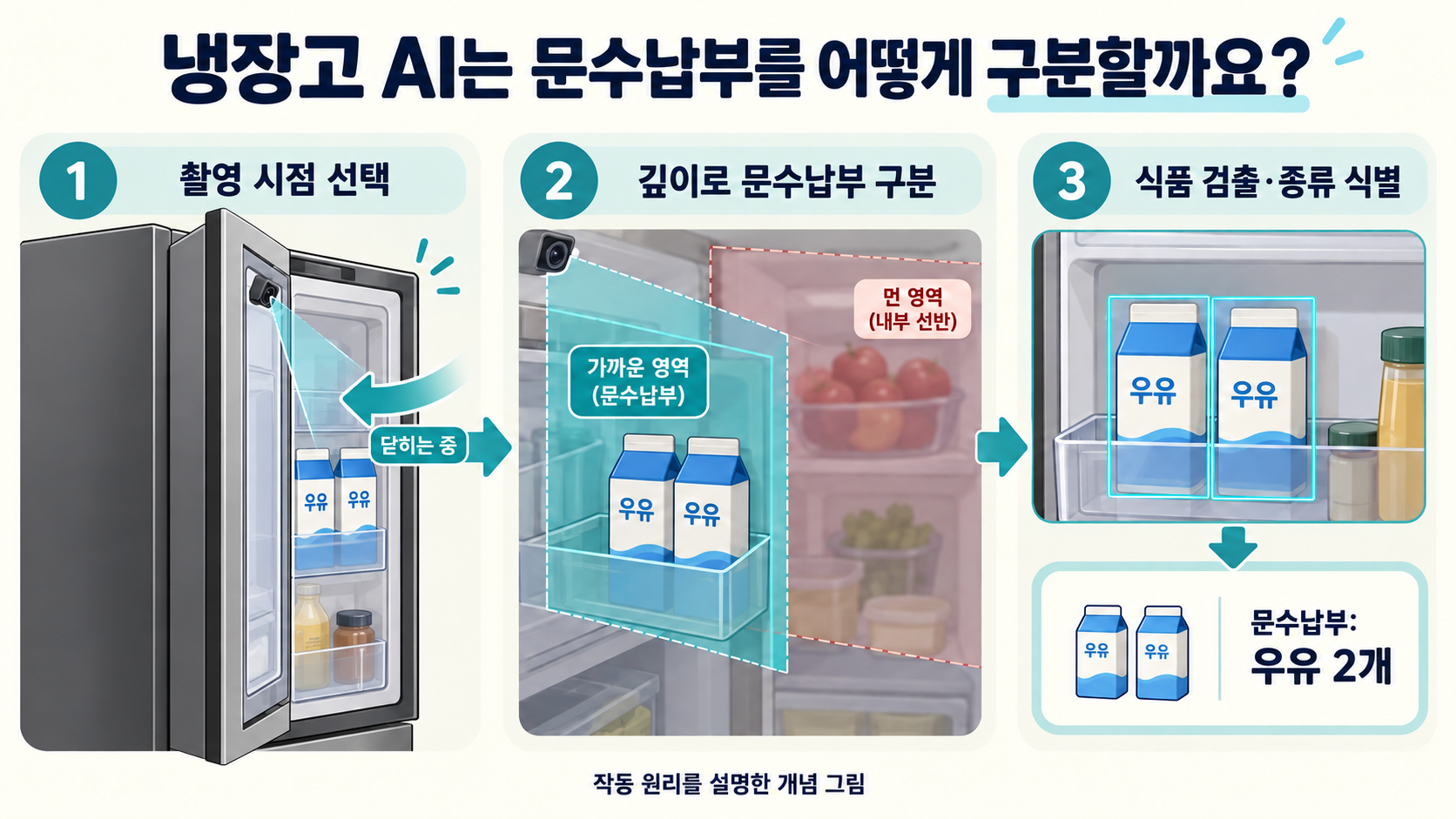
LG’s AI refrigerator patent describes a way to identify food in a door storage area by combining the movement of the outer door with depth information. Before a model can name an item, the system must decide when to capture an image and which part of it to analyse. A hypothetical shared refrigerator helps explain the sequence from capture and region selection to recognition and inventory updates.
1. Why a photograph is not yet an inventory
An image of the inside of a refrigerator can help a shopper remember whether there is milk at home. Turning that image into a list organised by storage location requires more work. Similar containers may appear both in the door storage area and on shelves farther inside. The system needs to establish which space each visible item belongs to.
The arrangement discussed in the patent has an inner door with food storage and an outer door in front of it. Opening the outer door gives access to the food on the inner door. A camera on the outer door faces that storage area. This arrangement addresses food in the door that may be difficult to see using only a camera looking down from the ceiling of the refrigerator.
Two design questions are linked. As the outer door moves, the camera’s view changes, so the system must choose a suitable moment to capture the food. It must also keep items on the shelves behind the door from being counted as part of the door inventory. Preparing the input image is therefore an integral part of producing the list.
2. Selecting a capture point as the door closes
Consider a user opening and closing the outer door while the inner door remains closed. A sensor detects the opening, closing and opening angle of the outer door. The processor uses those signals to decide when to take a picture. Capture is linked to a door-use event, rather than treating every moment of camera operation as equally useful for analysis.
In one disclosed example, the processor first checks whether the outer door has opened to at least a preset angle. After closing begins, it issues a capture command when the door reaches the angle selected for photographing the storage area. This provides an image after the user has put food in or taken it out. The preset angle forms part of the conditions for obtaining a suitable view.
The description also covers a different branch: if the door was opened only slightly and did not reach that angle, capture can be triggered when closing is detected. The useful distinction is that capture conditions depend on how the door was used. The examples do not establish one universal capture instant for every opening movement.
Camera position and orientation are designed together with that timing. One example places a camera near an edge of the outer door and sets its tilt so that it faces the inner door at the capture angle. Multiple cameras can cover upper and lower portions of the storage area. Choosing when to take the picture and choosing what will be in view are connected tasks.
3. Using depth to separate door storage from the space behind it
A photograph aimed at the door storage area may also include shelves farther inside. If two milk cartons at the front are mixed with milk on a rear shelf, the door inventory may be wrong. Depth information helps distinguish those locations. Here, depth means information about the distance between the sensor and different parts of the scene.
A conventional camera image provides colour and shape, while a depth image can distinguish nearer and more distant regions. The patent describes using a reference depth associated with the space occupied by the inner door to separate that area from the internal storage compartment. The corresponding rear-compartment region is then excluded from the camera image used to recognise food in the door.
This exclusion defines the scope of image analysis. It does not remove the food itself or imply that the rear shelves are empty. Those items remain in the refrigerator but are outside the particular recognition task for the door storage area. The separation keeps items from different spaces from being merged into the same inventory.
The camera image and depth image also need to correspond to the same scene. If one covers the door storage while the other covers a different shelf, colour and distance information cannot be paired directly. The description explains positioning the depth sensor near the camera and matching their fields of view. Capture and distance sensing therefore form a coordinated processing stage.
4. Finding an item and identifying what it is
Once the region of interest has been selected, the system must locate the food. Object detection finds the position and extent of an object within an image. A rectangular bounding box around a container, for example, defines the portion of the image that subsequent processing can examine.
Object identification addresses a different question: what is inside that box? Containers with similar shapes may hold milk or another drink, and the inventory needs the appropriate name. The patent describes separate models for locating objects and identifying them. Image data for a detected box passes to the identification model, whose result supplies information about the food.
During training, food images and associated correct labels, such as item names, are used to prepare a model. During use, newly captured images provide object locations and identification results. Preparing training data and recognising a fresh refrigerator image are distinct stages, even though they belong to the same overall system.
Those results support a storage record containing information such as food type, location and quantity. A bounding box contributes location information; identification contributes the item’s name. Converting a photograph into a readable inventory requires both kinds of information to pass through the processing chain.
5. A shared refrigerator: following the milk count
Imagine a small office refrigerator with two milk cartons in the door storage and three apples on a shelf behind them. An image taken while the outer door closes may show both areas. Separating them using depth leaves the two cartons at the front as the objects of this particular door-storage analysis.
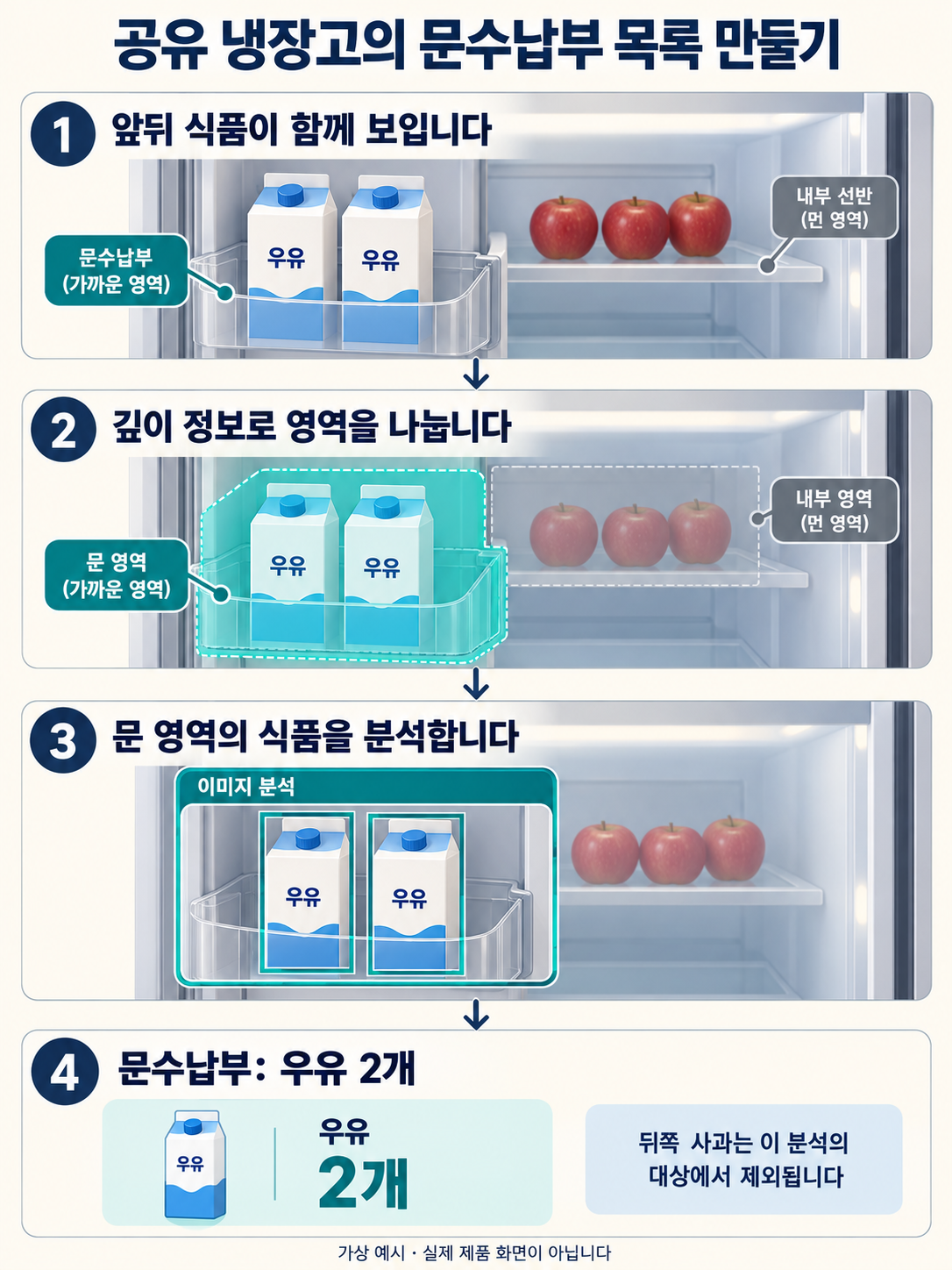
Suppose detection locates two objects and identification recognises both as milk. The door inventory can then record two cartons. When a colleague removes one and closes the door, a new capture and recognition result can update the quantity. The patent illustrates notifications and lists that reflect food being added or removed.
The user can also correct the result. If two cartons were put in but the list shows only one, a quantity-correction control allows the record to be changed. This connects the display of an automated recognition result with a person’s correction of the stored state. The input used to change the list is part of the service’s operation.
The example involves more than a single calculation that produces the label “milk”. The system obtains a new state after the door is used, organises food by storage location and communicates the result in a form the user can check. Image data, distance, identity and quantity each perform a different role.
6. ThinQ Food and the wider food-management experience
In its CES 2026 materials, LG introduced ThinQ Food for the LG SIGNATURE Smart InstaView refrigerator. The company describes an internal camera that helps identify ingredients, along with recipe suggestions and possible ingredient substitutions based on what is inside. This connects checking available food with deciding what to prepare.
An inventory and a cooking suggestion serve different functions. The inventory holds recognised items and storage information; a recipe feature uses that information to propose a use for the ingredients. Development teams can identify which output becomes the next feature’s input. An incorrect item passed between stages may affect a later suggestion, making the intermediate data structure important.
LG also states that recognition results may vary with food type and placement. When considering the use of these features, layout and occlusion in real storage conditions therefore matter. Separating ingredient recognition, information display and recipe suggestions makes it easier to explain the assistance provided at each stage.
7. Documenting the chain from capture to inventory
The technical interest lies in the connection between the capture environment and AI processing. Door sensing supplies capture conditions; the camera and depth sensor represent the same space in different ways. Region selection determines which food is analysed, and detection and identification provide the locations and names needed for an inventory.
For a team developing its own product, a description such as “AI food recognition” is only a starting point. A more useful technical account records the inputs and processing sequence: which door movement is detected, how the two images correspond, which region is excluded and when the result enters the inventory.
User correction can also be documented as a distinct technical flow. How the system displays an image-derived count, accepts a corrected count and carries it into the next state affects the experience. Recording the concrete operations added between capture, spatial separation, model processing and user interaction helps explain what is technically different about a development.
The patent embodiments and LG’s product announcement are separate sources. This article does not establish that the announced product implements every feature of the patent.
LG AI refrigerator patent · US11669722B2 (USPTO)
LG official announcement · CES 2026 LG SIGNATURE and ThinQ Food
Naver’s image-translation patent: keeping translated text aligned with a moving camera
Samsung’s AI audio editing: preparing controls before separation finishes
Explore IPLEX’s AI projects, related publications and technical patent advisory services.
Explore our AI and patent practice