
An editable project contains more than a finished picture
Adobe’s US patent US12462456B2 describes non-destructive generative image editing. The central idea is to keep the original image and generated content in separate layers, together with information needed for later edits. A polished output alone may not reveal what was generated, which prompt was used or which alternatives were discarded.
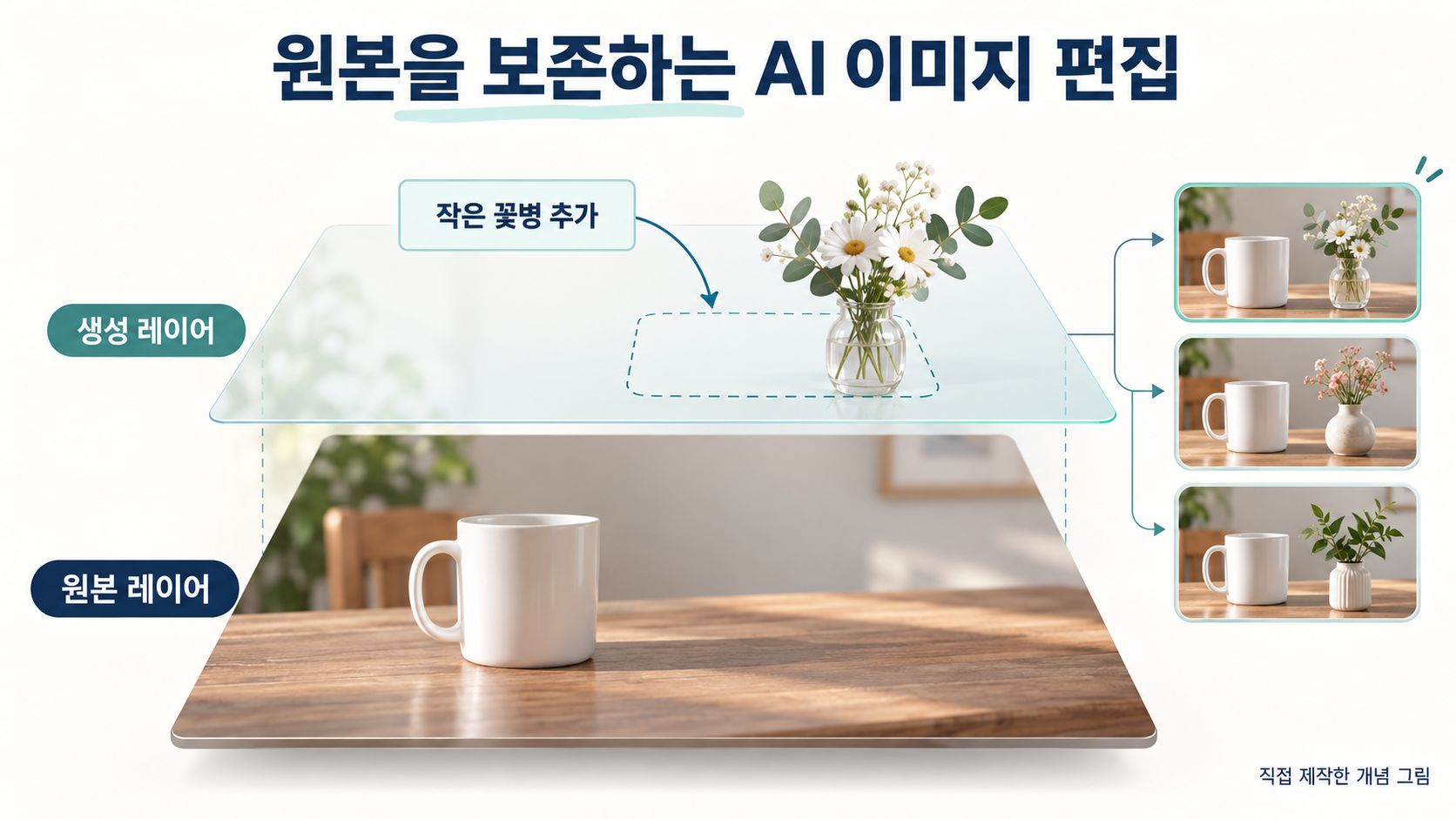
Consider a hypothetical product photograph of a cup on a table. An editor adds a vase, then a colleague requests a smaller vase or a different accessory. The illustrations here were created to explain that scenario; they are not patent drawings or evidence of a specific product’s implementation. Keeping an editable project makes such revisions easier to understand.
Layers, masks and the editor’s components
A layer is a separately managed part of a composite picture, much like transparent sheets stacked over a base photograph. The editor can display them together while retaining their individual contents. A mask identifies a region to process or display. The initial input mask represents the user’s selected area; a later subject mask identifies an object in generated content.
The disclosed architecture combines an image-generation network with a multilayer document editor. A global layer manager handles the document’s layers, a generative layer manager presents generation properties, an object-detection component locates generated subjects, and a taskbar connects selection and commands. Editable output depends on coordination between model execution, interface behaviour and stored data.
The selection answers where; the prompt answers what
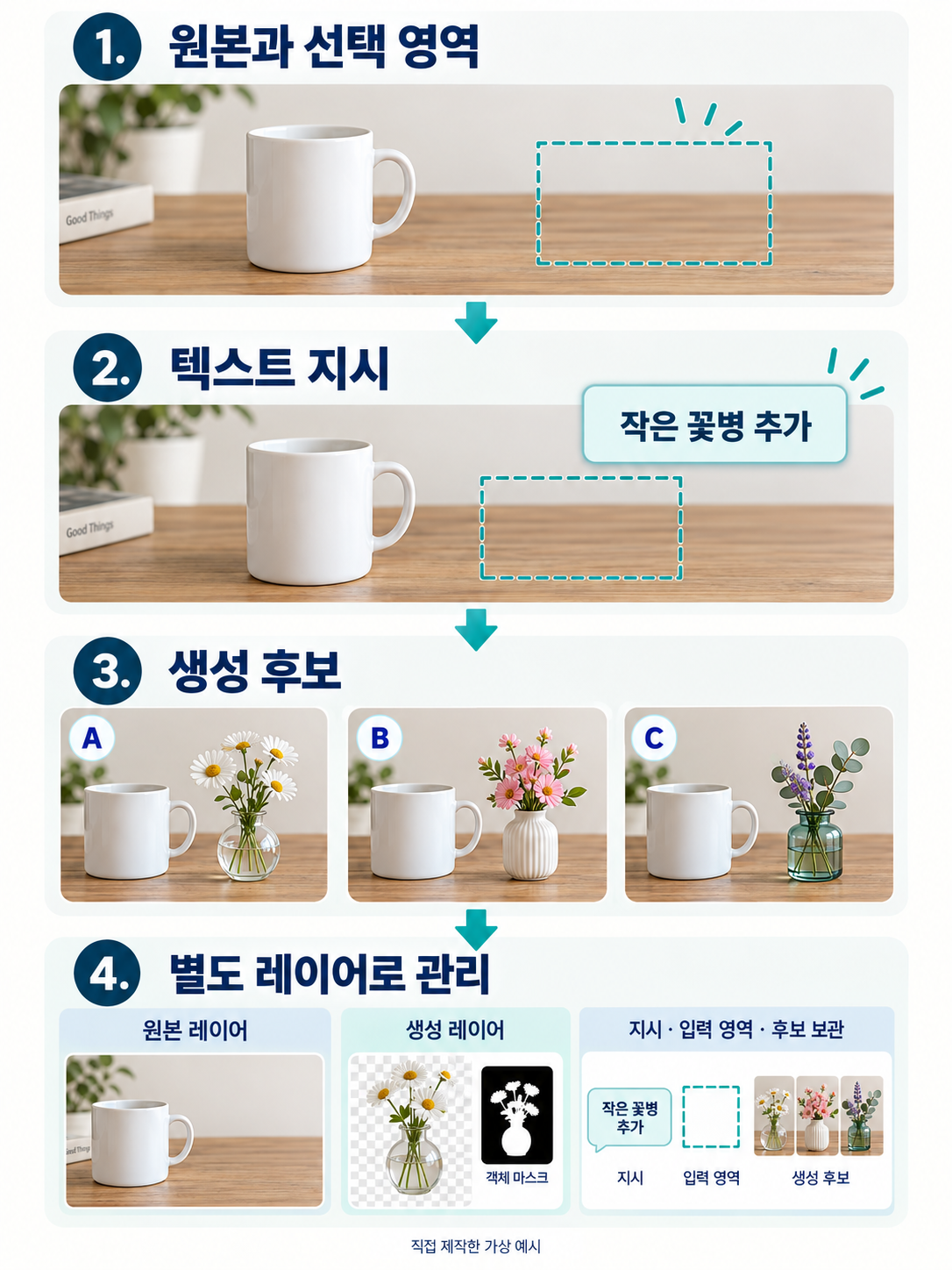
In the cup example, the user selects empty table space and enters a prompt such as “a small white vase with yellow flowers.” The image supplies surrounding context, the input mask defines the working region, and the prompt describes the requested content. The same words may yield a different task when selection or context changes.
The interface may expose a text field and generation button in response to the selection. The patent also describes generation without a text prompt, using the image and selection. Confirming an area, executing generation and choosing a result form one editing workflow, but they remain distinct operations.
A generated object is not the same as the selected area
A large rectangular input mask may contain a vase occupying only a small part of it. To edit that vase specifically, the system can detect the object in the generated image and create a subject mask. The generative layer includes that mask, which may guide subsequent generation.
The distinction is temporal and functional: the input mask defines the user’s request before generation; the subject mask identifies the resulting object afterward. Reusing the original selection and locating a generated subject are different processing paths. Moving existing pixels also differs from regenerating content to fit a new location’s context.
Store the alternatives together with their generation context
The editor displays a first layer containing the original and a second layer containing generated imagery and the subject mask. The composite can look different while the original layer remains available. The description also stores the prompt and input mask as properties and allows multiple generated alternatives within a generative layer.
Other disclosed properties include a seed, model information and a creation time. A seed supplies an initial condition; recording it alone does not guarantee identical output across different model versions or execution environments. A useful project links each alternative to the inputs and masks that produced it, rather than retaining an unexplained set of images.
A practical comparison with Generative Fill
For the hypothetical cup photograph, the editor can choose among vase alternatives already stored in a layer or modify the prompt and run the model again. Switching an existing alternative retrieves a saved result; regeneration performs new computation. These actions may appear similar on screen but require different data and controls.
Adobe’s official Generative Fill guidance describes selecting an area, entering a prompt or leaving it blank, generating, and choosing a variation in the Properties panel. Its non-destructive workflow provides useful product context, but does not establish that every feature or claim of this patent is implemented in a particular Photoshop version. Preserve a layered working document for revision and export a separate final image for publication.
What to document when developing an AI editor
Map the relationships among the original image, input mask, prompt, generated alternatives and subject masks. A change of alternative should display the matching subject mask. A new prompt or region should retain its connection to the new output. Decisions about preserving layers and earlier candidates determine which prior states a user can recover.
Saving, reopening and collaboration require the selected alternative and its generation context to remain understandable to another editor. A general click history serves a different purpose from input-and-output data attached to a generative layer. For technical and patent review, explain the complete selection, generation, object-region extraction, storage and subsequent-editing sequence, with concrete examples of what information passes between the stages.
Read the original Tistory analysis
Explore our AI patent practice